
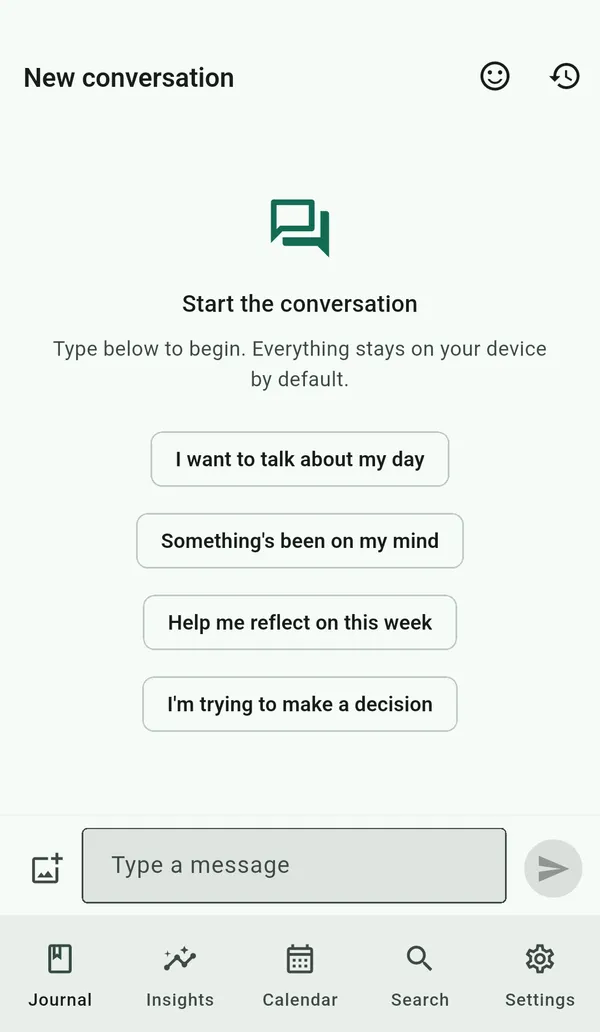
Graphophone is designed around a simple promise: nothing you write should have to leave your device. The AI features honour that by default — a small generation model is downloaded once on first run and then runs in-process, on your device's CPU, with no network call.
What runs locally, out of the box
- Reflect with AI — a multi-turn conversation that reflects back what you wrote and asks one open question at a time, in your choice of style (gentle, Socratic, Stoic, or coach). Out of the box it runs entirely on-device, which is why it works even on entries you've tagged device-only.
- AI summaries of your week, month, or year in Insights — a few warm sentences generated on your device by default.
- The one-tap reflection in the editor.
- Daily-prompt generation (curated locally; the network is never touched).
- Tag suggestions from sentiment scoring.
- Search ranking + snippets.
- Ask your journal — natural-language questions answered from your own entries, with citations. The semantic matching and the answer both run on-device.
- Weekly / monthly / yearly insight reports.
Choosing a model
Graphophone ships four on-device model tiers, all Qwen and all Apache-2.0, quantized to 4 bits. The app recommends one from your device's memory and you can change it any time in Settings → On-device AI. Each is a one-time download kept out of the base app, so the install stays small.
- Compact Qwen2.5 0.5B. ~469 MB. Runs on anything, including a five-year-old phone.
- Balanced Qwen2.5 1.5B. ~1.0 GB, needs ~3.5 GB of RAM.
- Max Qwen3 4B Instruct. ~2.3 GB, needs ~7 GB of RAM. The default on 8 GB+ phones and laptops, and the first tier that reliably feels like being heard.
- Ultra Qwen2.5 7B. ~4.4 GB, needs ~16 GB of RAM. Desktop-class.
The first time you use a feature like Reflect with AI, the app downloads your chosen tier into its private data directory, after which it runs offline. A second, tiny embedding model — downloadable from the same place — sharpens semantic search and “ask your journal”.
The "ask your journal" model
Semantic search and "ask your journal" use a second, tiny model that turns
text into meaning vectors — all-MiniLM-L6-v2 (~91 MB). Ask
works the moment you install, using a built-in matcher; downloading this
model in Settings → On-device AI sharpens the results. Like everything
else here, it runs on your device and never sees the network after the
one-time download — and entries you tag no-AI are excluded before any
vector is ever computed.
Tier-1: platform models (not yet enabled)
Some operating systems now ship a small model of their own — Apple Foundation Models on iOS 26+, Gemini Nano on AICore-capable Android. Routing to them where they exist is on the roadmap, and it would be a faster, more battery-friendly path than a bundled GGUF on the devices that have one. It is not switched on today: every on-device reply you get comes from the model Graphophone downloaded itself, on every platform, which is also why the tiers above are the ones worth choosing between.
When it does arrive it will be an accelerator for the structured work — distilling what to remember, and similar background passes — and not for conversation. A reply you are actually talking to should not be shaped by a general-purpose assistant's safety guardrails, which are at their most damaging on exactly the open-ended, emotional writing this app is for.
A bigger model, on a computer you own
A phone can only hold a small model. If you already run
Ollama, LM Studio,
llama.cpp, Jan, LocalAI or vLLM on a desktop, you can
point Graphophone at it in Settings and get that model's replies instead —
over your own network, with no account and no cloud provider in the
middle. It is off by default, and turning it on changes nothing else: the
journal is still encrypted on your device, and a
#no-ai entry still never enters a prompt.
Three things the app does rather than asks you to trust:
- It says where the reply came from. While a reply is crossing your network a banner names the host it is going to, and the AI audit log records it as LAN rather than as local.
- It refuses the open internet in the clear. An address
on your own network may be plain
http://; anything else must behttps://, and redirects are never followed. - Your most private entries stay put. Entries tagged
#private,#medical,#therapy,#confidentialor#legalare held to on-device only, so they are left out of anything a server would see.
It works away from home, too
Nothing here is limited to the room your desktop is in. A
Tailscale address —
either a MagicDNS name like
my-desktop.tail1234.ts.net or the 100.x address
it hands out — is treated as your own network, because the traffic is
WireGuard-encrypted end to end before Graphophone ever sees it. So the same
setup answers from a hotel, and it does so over a tunnel only your devices
can enter. No port forwarding, no exposing a model server to the internet,
and no public tunnel service in the middle.
What is not allowed is the shortcut people usually reach for
instead: a plain http:// address on the open internet. That
is refused outright rather than warned about.
Cloud, if you ever want it (coming soon)
Cloud is a separate thing, and it has not shipped. Bring-your-own-key is on the near-term roadmap for people who want the polish of Claude or GPT for one-off tasks like summarising a year of entries. When it ships it will work like this, and never any other way:
- You'll paste your own API key (OpenAI, Anthropic, OpenRouter) in Settings — opt-in, never on by default.
- You'll choose which features the cloud may serve. Reflection in the editor can stay local while you allow, say, a monthly summary to go to the cloud.
- Every cloud call is announced first (the on-screen network banner appears for the duration), recorded in the AI audit log, and contains only what the feature needs — never your full vault.
BYOK will always be free. We never pass through cloud calls or take a cut.