
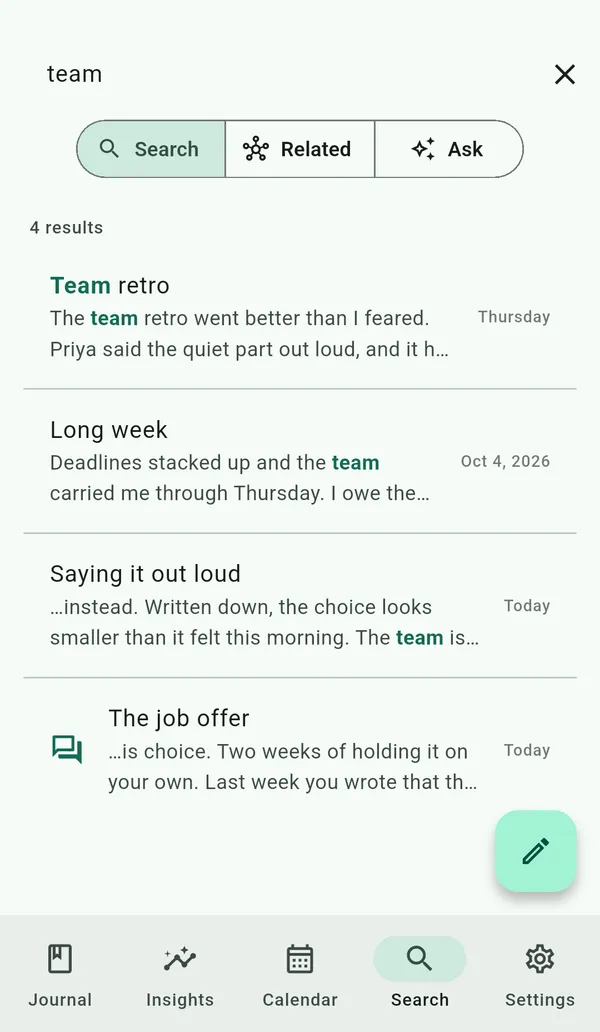
Graphophone gives you three ways to find what you've written, from the same
search bar — pick the mode with the toggle under it. All of them run
on your device by default: nothing you type and nothing you've written leaves
it, and entries you've tagged no-AI are never used by the
meaning-based ones.
Search — fast keyword lookup
The default mode searches across every entry as you type and ranks the best matches first, highlighting the words you matched in both the title and the snippet so it's clear at a glance why each result came up. A quiet count above the list tells you how many entries matched.
It understands a few operators:
- Words
feel calmfinds entries with both. - Exact phrase
"deep breath"matches the words together, in order. - Exclude
-anxiousdrops entries containing that word. - Filter by tag
tag:worklimits results to a tag. Tapping a tag anywhere in the app drops you here pre-filtered.
With the bar empty, Search shows your tags (most-used first) — tap one to search it, long-press or right-click to rename, merge, or remove it across every entry — plus a shortcut to browse by date.
Related — find by meaning
Keyword search only finds the words you remember. Related finds entries by meaning instead: type a topic like "feeling overwhelmed at work" and it surfaces the most semantically similar entries, ranked — even if they never use those exact words. It's the same engine behind the editor's "Related entries" see-also. The matching runs on-device, and works the moment you install; downloading the embedding model in Settings sharpens it.
Ask — answers from your own entries
Ask your journal answers a natural-language question —
"what was I anxious about last spring?" — using your own entries
as the source. The on-device AI retrieves the most relevant entries, reads
them, and writes a grounded answer with tappable citations, so you can jump
straight to the entries it drew from. The answer renders as formatted text
and copies in one tap. Both the retrieval and the answer run on-device, and
entries tagged no-AI are excluded before anything is read.
Other ways to find things
- Browse by date A month calendar tinted by your mood; tap the title to jump to any month, or open a day to read it.
- Browse by mood "Show me my good days" from the mood key or Insights.
- On this day Entries from this date in earlier years, surfaced on Home.
- Pinned Favourite an entry to keep it at the top of Home.
Privacy
Every mode here is on-device. Graphophone never sends your queries or your
entries to a server to search them, and it stores no search history. The
meaning-based modes (Related and Ask) exclude any entry you've tagged
no-AI before it's ever embedded or read.